导航 API
expo-gaode-map-navigation 包提供完整的路径规划和实时导航能力。
概述
导航包是独立的一体化解决方案,内置了地图渲染和导航功能:
- ✅ 包含地图能力:内置 MapView 和所有覆盖物组件
- ✅ 路径规划:驾车、步行、骑行、货车、摩托车等多种方式
- ✅ 实时导航:
ExpoGaodeMapNaviView组件提供完整的导航界面 - ❌ 不可与
expo-gaode-map共存:会产生 SDK 冲突
重要提示
安装 expo-gaode-map-navigation 后,不要同时安装 expo-gaode-map。导航包已包含所有地图功能。
安装
bun add expo-gaode-map-navigation
# 或
yarn add expo-gaode-map-navigation
# 或
npm install expo-gaode-map-navigation
初始化
在应用启动时初始化 SDK。首次安装时,同样必须先完成隐私同意;同意后原生会自动持久化并在后续冷启动恢复:
import { ExpoGaodeMapModule } from 'expo-gaode-map-navigation';

if (!ExpoGaodeMapModule.getPrivacyStatus().isReady) {
  ExpoGaodeMapModule.setPrivacyConfig({
    hasShow: true,
    hasContainsPrivacy: true,
    hasAgree: true,
  });
}

// 已通过 Config Plugin 或手动方式配置原生 Key,且仅地图/导航场景时,可不调用 initSDK
// 仅在使用 Web API 时调用:
ExpoGaodeMapModule.initSDK({ webKey: 'your-web-api-key' });

// 未配置原生 Key 时,才需要运行时传入移动端 Key
ExpoGaodeMapModule.initSDK({
  androidKey: 'your-android-key',
  iosKey: 'your-ios-key',
  webKey: 'your-web-api-key', // 可选
});
Config Plugin 自动配置
推荐使用 Config Plugin,它会自动将 API Key 配置到原生项目中,更安全且无需在代码中硬编码;但首次运行时的隐私同意仍需要你在业务层处理。
内置地图能力
导航包内置了一套独立的 MapView 和覆盖物实现,API 设计与核心包保持一致,但底层使用导航 SDK 对应的地图能力,因此不会依赖 expo-gaode-map。
地图组件导入
import { useRef } from 'react';
import {
  MapView,
  Marker,
  Cluster,
  type MapViewRef,
} from 'expo-gaode-map-navigation';
相机控制与事件节流
moveCamera(position, duration?)现在使用CameraUpdatecameraEventThrottleMs?: number可控制原生onCameraMove事件频率- 默认值为
32,传入0表示不节流
const mapRef = useRef<MapViewRef | null>(null);

await mapRef.current?.moveCamera(
  {
    target: { latitude: 39.9, longitude: 116.4 },
    zoom: 14,
  },
  300
);
自定义 Marker / Cluster
Marker自定义children时会自动测量布局尺寸Cluster现已支持icon?: string,可传网络 URL、本地文件路径或资源名称
fitToCoordinates
导航包的 MapViewRef 同样暴露了 fitToCoordinates(points, options?),用于根据点集自动调整视口。
await mapRef.current?.fitToCoordinates(routePoints, {
  duration: 500,
  paddingFactor: 0.2,
  maxZoom: 18,
});
TIP
expo-gaode-map-navigation 与 expo-gaode-map 都提供了 fitToCoordinates,但只对齐用户层 API 形状,不共享底层 MapView 实现。
calculateFitZoom
导航包内置的 ExpoGaodeMapModule 也支持 calculateFitZoom(points, options?),可在调用 moveCamera 前先估算合适 zoom。
import { ExpoGaodeMapModule } from 'expo-gaode-map-navigation';

const points = [
  { latitude: 39.9042, longitude: 116.4074 },
  { latitude: 39.91407, longitude: 116.39765 },
  { latitude: 39.92541, longitude: 116.39707 },
];

const zoom = ExpoGaodeMapModule.calculateFitZoom(points, {
  viewportWidthPx: 390,
  viewportHeightPx: 844,
  paddingPx: 48,
  minZoom: 3,
  maxZoom: 20,
});

await mapRef.current?.moveCamera(
  {
    target: points[0],
    zoom,
  },
  300
);
路径规划 API
calculateDriveRoute - 驾车路径规划
import { calculateDriveRoute, DriveStrategy } from 'expo-gaode-map-navigation';

const result = await calculateDriveRoute({
  type: 'drive',
  from: { latitude: 39.9, longitude: 116.4 },
  to: { latitude: 39.91, longitude: 116.41 },
  strategy: DriveStrategy.FASTEST, // 速度优先
  waypoints: [                      // 途经点(可选)
    { latitude: 39.905, longitude: 116.405 },
  ],
  carNumber: '京A12345',             // 车牌号(可选,用于限行)
  avoidPolygons: [                  // 避让区域(可选)
    [
      { latitude: 39.92, longitude: 116.42 },
      { latitude: 39.93, longitude: 116.43 },
    ],
  ],
});

// 返回 DriveRouteResult
console.log(result.count);          // 路线数量
console.log(result.mainPathIndex);  // 主路线索引
result.routes.forEach((route) => {
  console.log(`距离: ${route.distance}米`);
  console.log(`时间: ${route.duration}秒`);
  console.log(`收费: ${route.tollCost}元`);
  console.log(`红绿灯: ${route.trafficLightCount}个`);
});
DriveStrategy 策略枚举:
enum DriveStrategy {
  FASTEST = 0,                         // 速度优先(时间最短)
  FEE_FIRST = 1,                       // 费用优先(不走收费)
  SHORTEST = 2,                        // 距离优先
  NO_EXPRESSWAYS = 3,                  // 不走快速路
  AVOID_CONGESTION = 4,                // 躲避拥堵
  NO_HIGHWAY = 5,                      // 不走高速
  NO_HIGHWAY_AVOID_CONGESTION = 6,     // 不走高速且避免拥堵
  AVOID_COST_CONGESTION = 7,           // 躲避收费和拥堵
  NO_HIGHWAY_AVOID_COST_CONGESTION = 8,// 不走高速且躲避收费拥堵
  AVOID_CONGESTION_COST = 9,           // 躲避拥堵和收费
}
calculateWalkRoute - 步行路径规划
import { calculateWalkRoute, TravelStrategy } from 'expo-gaode-map-navigation';

const result = await calculateWalkRoute({
  type: 'walk',
  from: { latitude: 39.9, longitude: 116.4 },
  to: { latitude: 39.91, longitude: 116.41 },
  travelStrategy: TravelStrategy.MULTIPLE, // 多路线
  // 或使用:multiple: true
});

console.log(`步行距离: ${result.distance}米`);
console.log(`预计时间: ${Math.floor(result.duration / 60)}分钟`);
calculateRideRoute - 骑行路径规划
import { calculateRideRoute, RideStrategy } from 'expo-gaode-map-navigation';

const result = await calculateRideRoute({
  type: 'ride',
  from: { latitude: 39.9, longitude: 116.4 },
  to: { latitude: 39.91, longitude: 116.41 },
  strategy: RideStrategy.FASTEST, // 速度优先
  multiple: true,
});
RideStrategy 策略枚举:
enum RideStrategy {
  DEFAULT = 0,   // 推荐路线
  FASTEST = 1,   // 速度优先
  SHORTEST = 2,  // 距离优先
}
calculateTruckRoute - 货车路径规划
import { calculateTruckRoute, TruckSize } from 'expo-gaode-map-navigation';

const result = await calculateTruckRoute({
  type: 'truck',
  from: { latitude: 39.9, longitude: 116.4 },
  to: { latitude: 39.91, longitude: 116.41 },
  size: TruckSize.MEDIUM,  // 货车尺寸
  height: 3.5,             // 高度(米)
  width: 2.5,              // 宽度(米)
  load: 5,                 // 载重(吨)
  weight: 10,              // 总重(吨)
  axis: 2,                 // 轴数
});
TruckSize 尺寸枚举:
enum TruckSize {
  MINI = 1,    // 微型货车
  LIGHT = 2,   // 轻型货车
  MEDIUM = 3,  // 中型货车
  HEAVY = 4,   // 重型货车
}
calculateMotorcycleRoute - 摩托车路径规划
import { calculateMotorcycleRoute } from 'expo-gaode-map-navigation';

const result = await calculateMotorcycleRoute({
  from: { latitude: 39.9, longitude: 116.4 },
  to: { latitude: 39.91, longitude: 116.41 },
  motorcycleCC: 250,          // 排量(cc)
  carNumber: '京A12345',       // 车牌号(可选)
  strategy: DriveStrategy.FASTEST,
});
calculateTransitRoute - 公交换乘路径规划
导航 SDK 本身不直接承担公交算路实现;calculateTransitRoute 会在运行时回退到 expo-gaode-map-web-api。
import { calculateTransitRoute } from 'expo-gaode-map-navigation';

const result = await calculateTransitRoute({
  type: RouteType.TRANSIT,
  from: { latitude: 39.9, longitude: 116.4 },
  to: { latitude: 39.91, longitude: 116.41 },
  city1: '010',
  city2: '010',
});
公交算路 fallback(回退)
- 需要额外安装
expo-gaode-map-web-api - 需要在
ExpoGaodeMapModule.initSDK({ webKey })中提供webKey - 返回结果会被映射成导航包现有的用户层结果形状,方便沿用现有路线展示逻辑
如果未安装 expo-gaode-map-web-api,运行时会抛出明确错误,而不是静默失败。
API 边界
- 导航包内置地图能力,但地图实现与
expo-gaode-map独立维护 - 用户层输入输出会尽量与核心包保持一致,例如
LatLngPoint、fitToCoordinates - 可共享的范围仅限纯 TS 的 route / AOI 数据适配工具、文档和测试思路
- 原生地图桥接、overlay 宿主逻辑、MapView facade 不会和核心包合并
calculateEBikeRoute - 电动车路径规划
import { calculateEBikeRoute } from 'expo-gaode-map-navigation';

const result = await calculateEBikeRoute({
  from: { latitude: 39.9, longitude: 116.4 },
  to: { latitude: 39.91, longitude: 116.41 },
  multiple: true,
});
官方导航组件 API
openOfficialNaviPage - 打开官方导航页
调用高德官方导航组件(Android: AmapNaviPage,iOS: AMapNaviCompositeManager)。
import { openOfficialNaviPage } from 'expo-gaode-map-navigation';

const ok = await openOfficialNaviPage({
  from: { latitude: 39.909186, longitude: 116.397411, name: '起点' }, // 可选
  to: { latitude: 39.908823, longitude: 116.39747, name: '终点' },      // 必填
  pageType: 'NAVI',                 // ROUTE | NAVI
  startNaviDirectly: true,
  naviMode: 2,                      // 1=实时导航, 2=模拟导航(官方组件)
  routeStrategy: 10,
  theme: 'BLUE',
  trafficEnabled: true,
  showCrossImage: true,
  showRouteStrategyPreferenceView: true,
  carInfo: {
    carType: '0',
    carNumber: '京A12345',
    restriction: true,
  },
});
返回值:
Promise<boolean>:true表示调起请求已成功发送(不代表已到达目的地)
通用参数(Android / iOS):
| 参数 | 类型 | 说明 |
|---|---|---|
from | { latitude, longitude, name?, poiId? } | 起点,可选;不传通常使用“我的位置” |
to | { latitude, longitude, name?, poiId? } | 终点,必填 |
waypoints | Array<{ latitude, longitude, name?, poiId? }> | 途经点,最多 3 个 |
pageType | 'ROUTE' | 'NAVI' | 打开路线页或直接导航页 |
startNaviDirectly | boolean | 是否直接进入导航页 |
theme | 'BLUE' | 'WHITE' | 'BLACK' | 官方组件主题 |
routeStrategy | number | 路线策略值 |
naviMode | number | 直接导航模式:1 实时、2 模拟(iOS 官方组件当前不支持模拟) |
trafficEnabled | boolean | 是否显示实时路况 |
showCrossImage | boolean | 是否显示路口放大图 |
showRouteStrategyPreferenceView | boolean | 是否显示策略偏好页 |
multipleRouteNaviMode | boolean | 驾车多路线模式 |
truckMultipleRouteNaviMode | boolean | 货车多路线模式(付费能力) |
showEagleMap | boolean | 是否显示鹰眼小地图 |
scaleAutoChangeEnable | boolean | 是否自动缩放比例尺 |
showExitNaviDialog | boolean | 是否显示退出导航确认 |
needCalculateRouteWhenPresent | boolean | 打开组件时是否自动算路 |
needDestroyDriveManagerInstanceWhenNaviExit | boolean | 退出时是否销毁 DriveManager |
carInfo | object | 车辆信息(车牌、限行、货车参数等) |
Android 特有参数:
| 参数 | 说明 |
|---|---|
dayAndNightMode | 昼夜模式:0 自动、1 白天、2 夜间 |
broadcastMode | 语音播报:1 简洁、2 详细、3 静音 |
carDirectionMode | 视角模式:1 正北朝上、2 车头朝上 |
showVoiceSettings | 是否显示语音设置项 |
secondActionVisible | 是否显示“下下个路口”引导 |
useInnerVoice | 是否使用内置语音 |
iOS 特有参数:
| 参数 | 说明 |
|---|---|
mapViewModeType | 地图样式类型(覆盖 dayAndNightMode) |
broadcastType | 播报类型(覆盖 broadcastMode) |
trackingMode | 跟随模式(覆盖 carDirectionMode) |
showNextRoadInfo | 是否显示随后转向图标 |
showBackupRoute | 多路线模式下是否显示备选路线 |
onlineCarHailingType | 网约车模式 |
showRestrictareaEnable | 是否显示限行图层(付费能力) |
removePolylineAndVectorlineWhenArrivedDestination | 到达后是否移除路线与牵引线 |
showCameraDistanceEnable | 是否显示电子眼距离(SDK 支持时生效) |
scaleFactor | 地图缩放比例(SDK 支持时生效) |
注意事项:
- iOS 直接导航(
pageType='NAVI'或startNaviDirectly=true)需要开启后台定位能力(UIBackgroundModes: location),否则会返回BACKGROUND_LOCATION_NOT_ENABLED。 - iOS 官方导航组件模式不支持模拟导航;若传
naviMode=2会直接返回错误提示。 - Android 官方导航组件依赖
AmapRouteActivity,本插件默认会自动注入到AndroidManifest.xml。
独立路径规划 API
独立路径规划不会影响当前导航状态,适用于路线预览、对比和切换场景。
independentDriveRoute - 独立驾车路径
import { independentDriveRoute } from 'expo-gaode-map-navigation';

const result = await independentDriveRoute({
  from: {
    latitude: 39.9,
    longitude: 116.4,
    name: '起点名称',      // 可选
    poiId: 'B000A8VE1H',  // 可选,POI ID
  },
  to: {
    latitude: 39.91,
    longitude: 116.41,
    name: '终点名称',
    poiId: 'B000A8VE2I',
  },
  waypoints: [
    { latitude: 39.905, longitude: 116.405, name: '途经点1' },
  ],
  strategy: DriveStrategy.FASTEST,
  carNumber: '京A12345',
  restriction: true, // 考虑限行
});

// 返回 IndependentRouteResult
console.log(result.token);         // 用于后续操作的 token
console.log(result.count);         // 路线数量
console.log(result.mainPathIndex); // 主路线索引
console.log(result.routeIds);      // 路线ID列表
console.log(result.routes);        // 路线数组
independentTruckRoute - 独立货车路径
const result = await independentTruckRoute({
  from: { latitude: 39.9, longitude: 116.4, name: '起点' },
  to: { latitude: 39.91, longitude: 116.41, name: '终点' },
  strategy: DriveStrategy.FASTEST,
});
independentWalkRoute - 独立步行路径
const result = await independentWalkRoute({
  from: { latitude: 39.9, longitude: 116.4 },
  to: { latitude: 39.91, longitude: 116.41 },
  multiple: true,
});
independentRideRoute - 独立骑行路径
const result = await independentRideRoute({
  from: { latitude: 39.9, longitude: 116.4 },
  to: { latitude: 39.91, longitude: 116.41 },
  multiple: true,
});
independentMotorcycleRoute - 独立摩托车路径
const result = await independentMotorcycleRoute({
  from: { latitude: 39.9, longitude: 116.4 },
  to: { latitude: 39.91, longitude: 116.41 },
  motorcycleCC: 250,
});
selectIndependentRoute - 选择独立路线
import { selectIndependentRoute } from 'expo-gaode-map-navigation';

// 方式1:使用路线索引
await selectIndependentRoute({
  token: result.token,
  routeIndex: 1, // 从0开始
});

// 方式2:使用路线ID
await selectIndependentRoute({
  token: result.token,
  routeId: result.routeIds[1],
});
startNaviWithIndependentPath - 使用独立路线启动导航
import { startNaviWithIndependentPath } from 'expo-gaode-map-navigation';

await startNaviWithIndependentPath({
  token: result.token,
  naviType: 0,      // 0=GPS导航, 1=模拟导航
  routeIndex: 0,    // 可选,不传则使用当前主路线
});
clearIndependentRoute - 清理独立路线
import { clearIndependentRoute } from 'expo-gaode-map-navigation';

await clearIndependentRoute({
  token: result.token,
});
完整示例:路线预览与切换
// 1. 规划多条路线
const routes = await independentDriveRoute({
  from: { latitude: 39.9, longitude: 116.4 },
  to: { latitude: 39.91, longitude: 116.41 },
});

// 2. 展示路线列表
routes.routes.forEach((route, index) => {
  console.log(`路线 ${index + 1}:`);
  console.log(`  距离: ${(route.distance / 1000).toFixed(2)}公里`);
  console.log(`  时间: ${Math.floor(route.duration / 60)}分钟`);
  console.log(`  收费: ${route.tollCost}元`);
});

// 3. 用户选择路线2
await selectIndependentRoute({
  token: routes.token,
  routeIndex: 1,
});

// 4. 启动导航
await startNaviWithIndependentPath({
  token: routes.token,
  naviType: 0, // GPS导航
});

// 5. 导航结束后清理
await clearIndependentRoute({
  token: routes.token,
});
ExpoGaodeMapNaviView 导航组件
ExpoGaodeMapNaviView 是高德官方提供的完整导航界面组件。
如果你的场景是“把导航页嵌进自己的 React Native 页面里”,库本身提供的是底层 ExpoGaodeMapNaviView、导航事件和原生参数;完整的自定义 HUD / 车道 HUD / 路况光柱参考实现,已经迁移到仓库内的 example-navigation 示例工程。
基础用法
import React, { useRef } from 'react';
import { ExpoGaodeMapNaviView, type ExpoGaodeMapNaviViewRef } from 'expo-gaode-map-navigation';

function NavigationScreen() {
  const naviViewRef = useRef<ExpoGaodeMapNaviViewRef>(null);

  const startNavigation = async () => {
    await naviViewRef.current?.startNavigation(
      { latitude: 39.9, longitude: 116.4 },   // 起点(null=当前位置)
      { latitude: 39.91, longitude: 116.41 }, // 终点
      1  // 0=GPS导航, 1=模拟导航
    );
  };

  const stopNavigation = async () => {
    await naviViewRef.current?.stopNavigation();
  };

  return (
    <ExpoGaodeMapNaviView
      ref={naviViewRef}
      style={{ flex: 1 }}
      naviType={1}
      enableVoice={true}
      showCamera={true}
      onNaviStart={(e) => console.log('导航开始')}
      onNaviEnd={(e) => console.log('导航结束')}
      onArrive={(e) => console.log('到达目的地')}
      onNaviInfoUpdate={(e) => {
        const { pathRetainDistance, pathRetainTime } = e.nativeEvent;
        console.log(`剩余: ${pathRetainDistance}米`);
      }}
    />
  );
}
自定义嵌入式导航 UI
库不再直接导出 EmbeddedNaviView 这类成品 UI 组件;这部分实现已经迁移到 example-navigation/lib/navigation-ui/*,便于你直接查看和复制。
推荐做法:
- 用
ExpoGaodeMapNaviView负责底层导航地图、语音、车道事件、路况事件、路口大图事件 - 用
onNaviInfoUpdate、onLaneInfoUpdate、onTrafficStatusesUpdate、onNaviVisualStateChange在业务侧自绘 HUD - 直接参考
example-navigation里的“自定义 UI 导航界面”示例页及对应源码 - 需要路线选择、起终点 / 多途经点输入时,直接参考
example-navigation里的“自定义路线选择页”示例
嵌入式说明:
- 在部分 React Native / Expo 宿主里,官方原生嵌入式
ExpoGaodeMapNaviView的顶部信息区、车道信息、路口大图联动效果,可能与高德官方 Demo / 官方黑盒页存在差异 - Android 上纯官方嵌入式 UI 更容易出现顶部信息区显示不全、叠层异常、局部样式跑偏等问题;这类页面更适合做边界验证,不建议直接作为业务成品
- 如果你的目标是稳定交付嵌入式导航页,建议以示例工程里的自定义 UI 实现为起点
- 如果你只是想验证原生官方嵌入式 UI,请参考
example-navigation中的official-embedded页面
样式效果对比
下图是示例工程里两种导航 UI 方案的实际效果截图,方便直接对比:
官方默认 1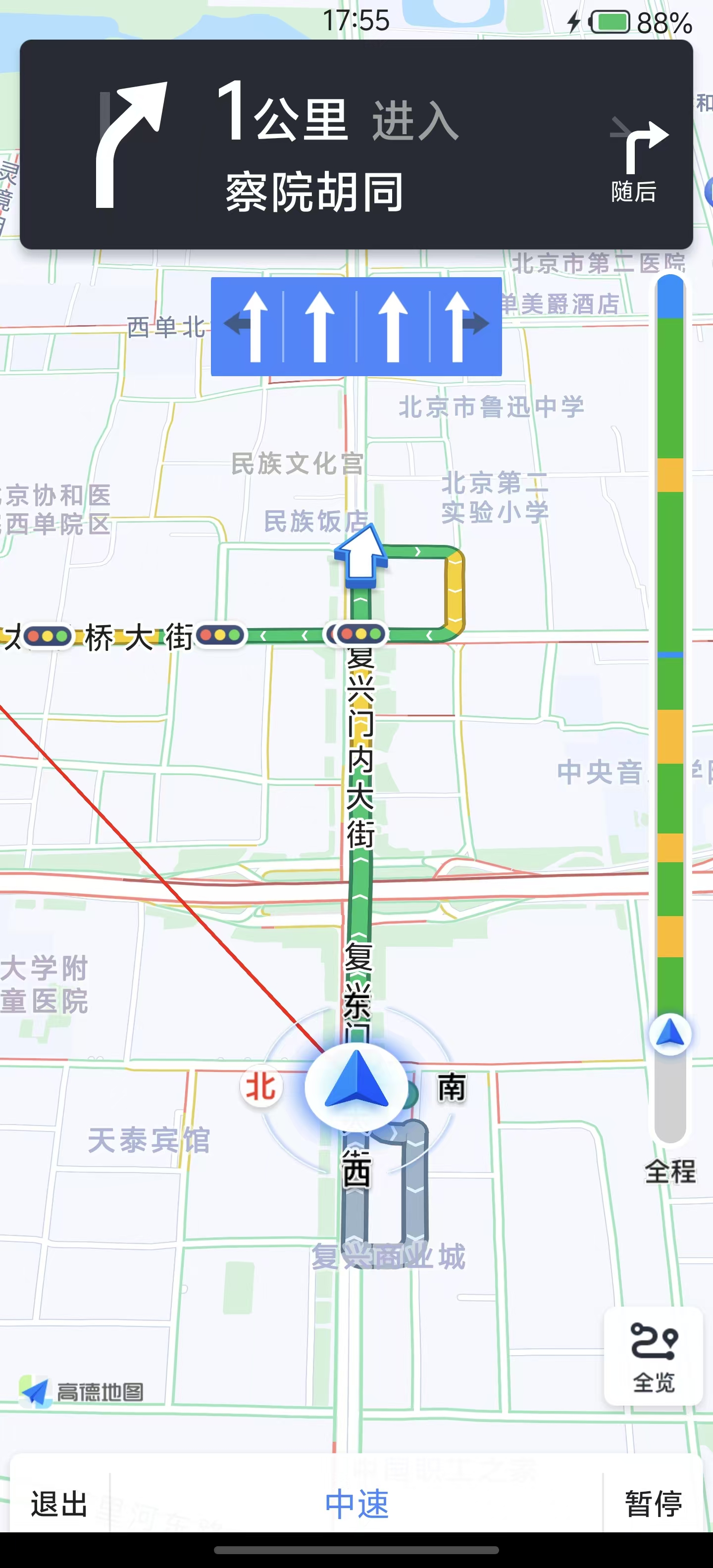 | 官方默认 2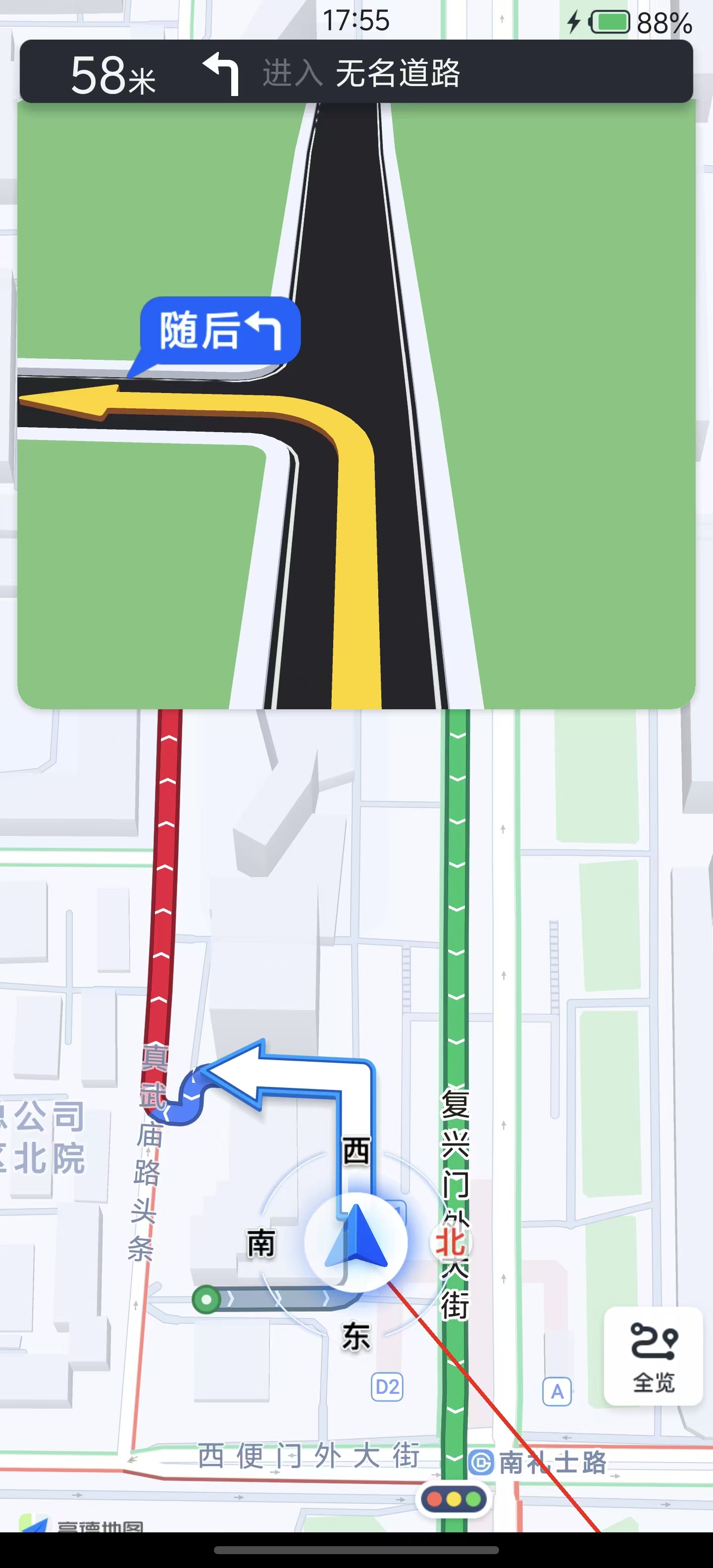 |
自定义 UI 1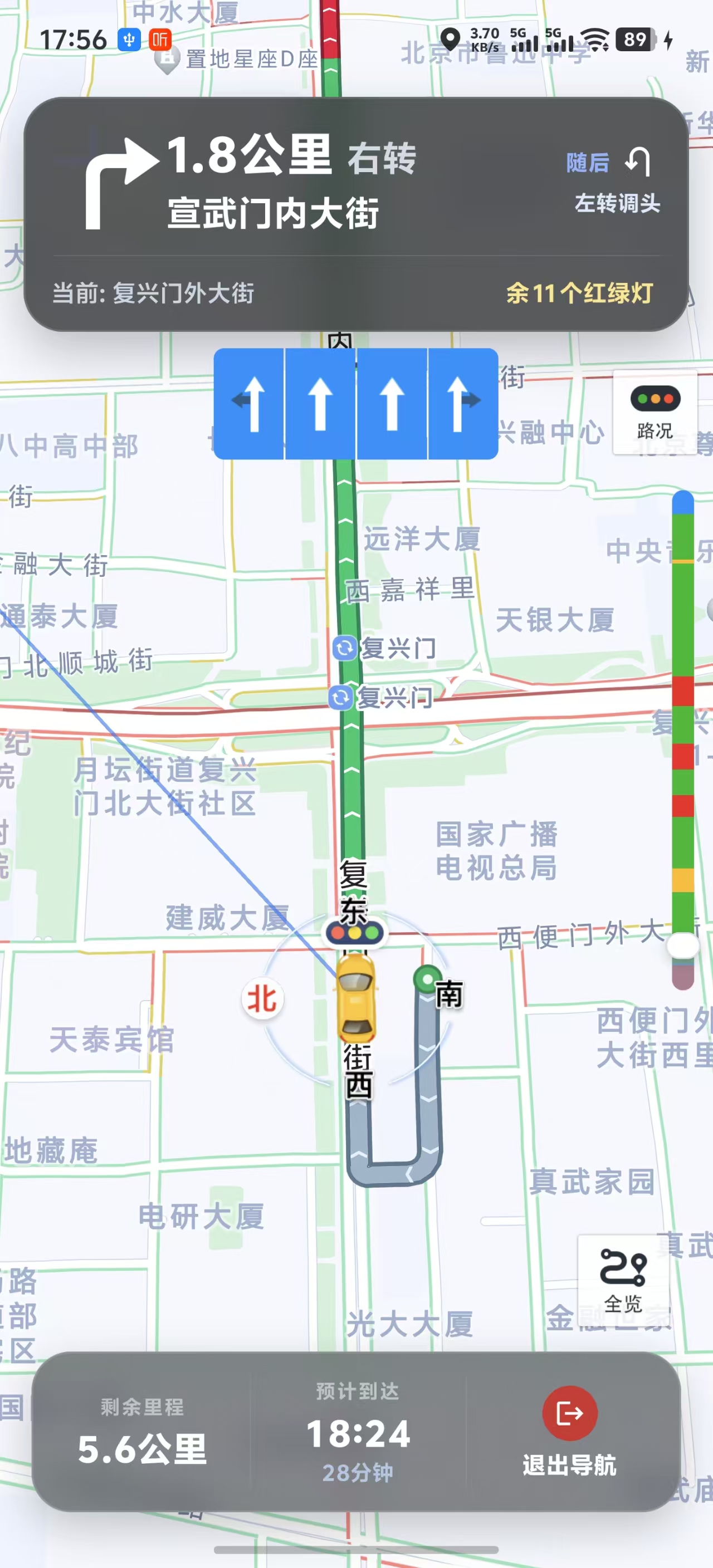 | 自定义 UI 2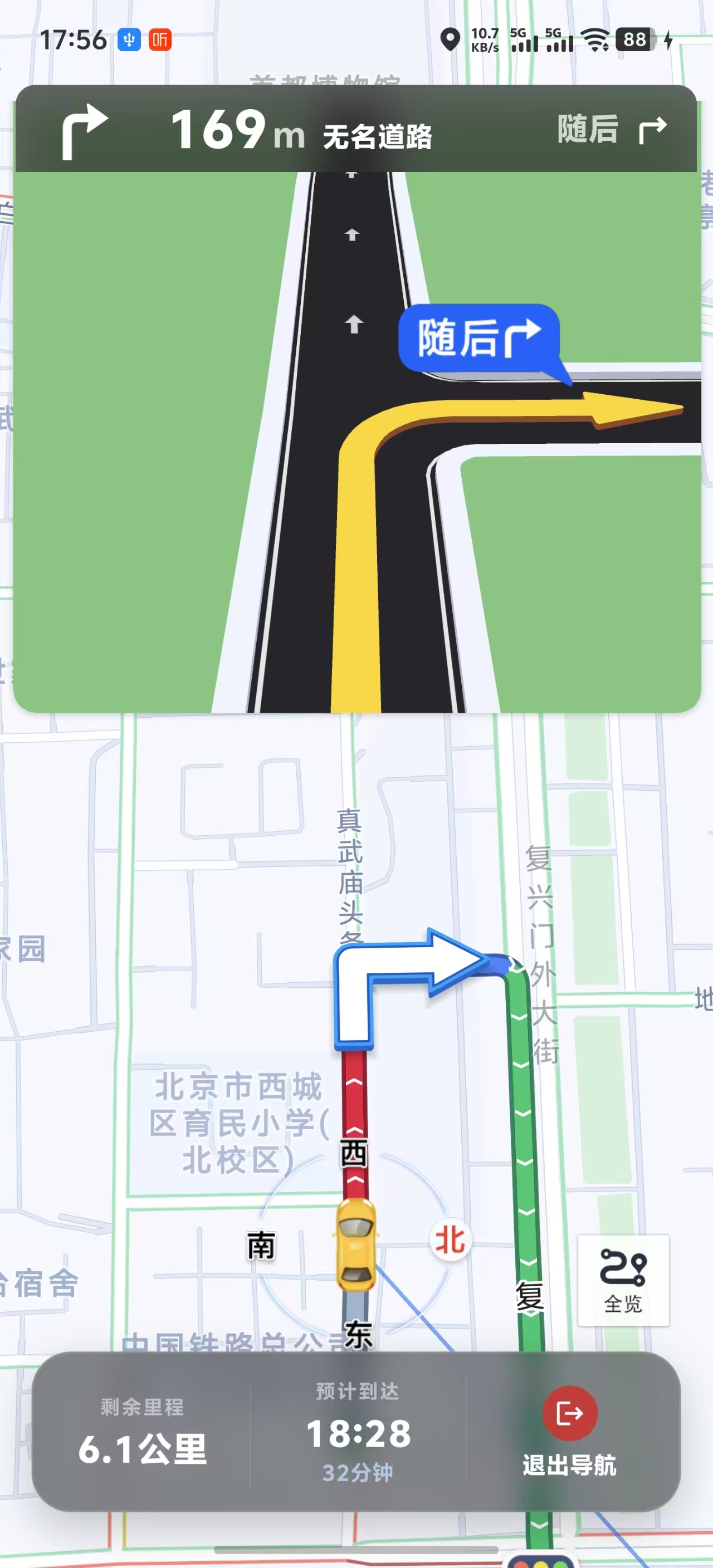 |
多路线规划示例
如果你需要起点 / 终点 / 多途经点输入,以及底部多条候选路线切换,可以参考 example-navigation 里的“自定义路线选择页”:

ExpoGaodeMapNaviView 属性参考
核心属性
| 属性 | 类型 | 默认值 | 说明 |
|---|---|---|---|
naviType | number | 0 | 导航类型:0=GPS导航, 1=模拟导航 |
enableVoice | boolean | true | 是否启用语音播报 |
showCamera | boolean | true | 是否显示摄像头提示 |
carImage | string | ImageSourcePropType | - | 自定义导航车标;iOS 映射 setCarImage,Android 映射 setCarBitmap |
carImageSize | { width?: number; height?: number } | - | 自定义导航车标尺寸,单位为 RN 逻辑像素(dp/pt);需同时传 width 与 height 才会生效 |
startPointImage | string | ImageSourcePropType | - | 自定义起点标注图 |
wayPointImage | string | ImageSourcePropType | - | 自定义途经点标注图 |
endPointImage | string | ImageSourcePropType | - | 自定义终点标注图 |
autoLockCar | boolean | true | 是否自动锁车 |
autoChangeZoom | boolean | true | 是否自动缩放地图 |
trafficLayerEnabled | boolean | true | 是否显示实时交通路况线 |
realCrossDisplay | boolean | true | 是否显示路口放大图 |
naviMode | number | 0 | 视角模式:0=车头朝上, 1=正北朝上 |
showMode | number | 1 | 显示模式:1=锁车态, 2=全览态, 3=普通态 |
mapViewModeType | number | 0 | 地图样式模式:0=白天, 1=黑夜, 2=自动, 3=自定义(Android 未提供样式路径时会降级为白天) |
isNightMode | boolean | false | 兼容属性,等价于 mapViewModeType 的 1/0;若同时传 mapViewModeType,以后者为准 |
showDriveCongestion | boolean | true | 是否显示拥堵气泡 |
showTrafficLightView | boolean | true | 是否显示红绿灯倒计时气泡 |
showCompassEnabled | boolean | true | 是否显示指南针;iOS 仅在显式传值时覆盖默认行为 |
naviArrowVisible | boolean | true | 是否显示路线转向箭头 |
showTrafficBar | boolean | true | 是否显示路况光柱 |
trafficBarFrame | object | - | iOS 路况光柱位置,格式 { x, y, width, height },底层映射 AMapNaviDriveView.tmcRouteFrame |
trafficBarColors | object | - | iOS 路况光柱颜色,可配置 unknown / smooth / fineOpen / slow / jam / seriousJam / defaultRoad |
showBrowseRouteButton | boolean | true | 是否显示全览按钮 |
showTrafficButton | boolean | true | Android 对应交通图层开关按钮,iOS 对应官方交通按钮 |
showUIElements | boolean | true | Android / iOS 均已实现整体 UI 显隐;iOS 会在视图就绪后应用 |
showVectorline | boolean | true | 是否显示牵引线 |
showGreyAfterPass | boolean | true | 走过的路线是否置灰 |
showTrafficLights | boolean | true | 是否显示红绿灯图标 |
Android 特有属性
| 属性 | 类型 | 默认值 | 说明 |
|---|---|---|---|
carOverlayVisible | boolean | true | 是否显示自车和罗盘 |
fourCornersImage | string | ImageSourcePropType | - | 自定义自车四角朝向图,映射 AMapNaviViewOptions.setFourCornersBitmap |
routeMarkerVisible | object | - | 路线标记点配置(见下文) |
isNaviTravelView | boolean | false | 设置是否为骑步行视图 |
laneInfoVisible | boolean | true | 是否显示车道信息 |
modeCrossDisplay | boolean | true | 是否显示 3D 路口模型 |
eyrieCrossDisplay | boolean | true | 是否显示鹰眼路口图 |
secondActionVisible | boolean | true | 是否显示辅助操作区域 |
backupOverlayVisible | boolean | true | 是否显示备用路线覆盖物 |
androidStatusBarPaddingTop | number | 0 | 导航视图顶部额外 padding,用于宿主页面自定义安全区 |
naviStatusBarEnabled | boolean | false | 是否启用高德官方导航状态栏;若当前 AMap SDK 不支持该接口,则自动降级为 no-op |
lockZoom | number | 18 | 锁车态缩放级别,范围 14-18 |
lockTilt | number | 35 | 锁车态倾斜角度,范围 0-60 |
eagleMapVisible | boolean | false | 是否显示鹰眼小地图 |
pointToCenter | object | - | 锁车态自车锚点位置,格式 { x, y } |
routeMarkerVisible 配置:
<ExpoGaodeMapNaviView
  routeMarkerVisible={{
    showStartEndVia: true,      // 显示起终途点
    showFootFerry: true,         // 显示步行轮渡扎点
    showForbidden: true,         // 显示禁行限行封路icon
    showRouteStartIcon: true,    // 显示路线起点icon(v9.0.0+)
    showRouteEndIcon: true,      // 显示路线终点icon(v9.0.0+)
  }}
/>
iOS 特有属性
| 属性 | 类型 | 默认值 | 说明 |
|---|---|---|---|
showRoute | boolean | true | 是否显示路线 |
carCompassImage | string | ImageSourcePropType | - | 自定义自车罗盘图,映射 setCarCompassImage |
cameraImage | string | ImageSourcePropType | - | 自定义摄像头图标,映射 setCameraImage |
showMoreButton | boolean | true | 是否显示更多按钮 |
lineWidth | number | - | 路线polyline宽度(0恢复默认) |
driveViewEdgePadding | object | - | 导航内容边距,格式 { top, left, bottom, right } |
screenAnchor | object | - | 地图视图锚点,格式 { x, y } |
showBackupRoute | boolean | true | 是否显示备选路线 |
showEagleMap | boolean | false | 是否显示鹰眼小地图 |
ExpoGaodeMapNaviView UI 能力清单
已开放且两端都有实现:
showCameracarImagecarImageSizestartPointImagewayPointImageendPointImageautoLockCarautoChangeZoomtrafficLayerEnabledrealCrossDisplaynaviModeshowModemapViewModeTypeisNightModeshowTrafficBarshowTrafficButtonshowUIElementsshowGreyAfterPassshowVectorlineshowCompassEnabledshowDriveCongestionshowTrafficLightView
仅 Android 已开放:
carOverlayVisiblefourCornersImagerouteMarkerVisiblenaviArrowVisiblelaneInfoVisiblemodeCrossDisplayeyrieCrossDisplaysecondActionVisiblebackupOverlayVisibleandroidStatusBarPaddingTopnaviStatusBarEnabledlockZoomlockTilteagleMapVisiblepointToCenterisNaviTravelView
Android 状态栏兼容性说明
naviStatusBarEnabled依赖高德 Android 导航 SDK 某些版本才提供的AMapNaviViewOptions.setNaviStatusBarEnabled(...)。- 当前封装已做兼容处理:如果宿主工程实际使用的 AMap SDK 不包含这个方法,模块不会再编译失败。
- 在这种情况下,Android 侧会跳过该设置并输出 warning,
naviStatusBarEnabled等价于 no-op。 - 若你需要它在 Android 上真正生效,请升级宿主工程使用的高德导航 SDK 到包含该 API 的版本。
仅 iOS 已开放:
showRoutecarCompassImagecameraImageshowMoreButtonlineWidthdriveViewEdgePaddingscreenAnchorshowBackupRouteshowEagleMap
嵌入式导航 UI 方案说明
ExpoGaodeMapNaviView:高德官方提供的原生嵌入式导航视图example-navigation/lib/navigation-ui/*:仓库示例提供的自定义嵌入式导航 UI 参考实现example-navigation/app/examples/ui-props.tsx:自定义 UI 导航界面示例页example-navigation/app/examples/route-picker.tsx:自定义路线选择页示例example-navigation/app/examples/official-embedded.tsx:纯官方嵌入式 UI 边界验证页openOfficialNaviPage:高德官方黑盒路线页 / 导航页
这三者是不同层次的能力,不应混淆:
- 如果你要完全沿用官方整页 UI,用
openOfficialNaviPage - 如果你要把导航嵌进自己的 RN 页面,但仍保留官方原生视图能力,用
ExpoGaodeMapNaviView - 如果你要在嵌入式场景下统一接管顶部信息展示,参考
example-navigation里的自定义 UI 示例
ExpoGaodeMapNaviView 事件
onNaviStart - 导航开始
onNaviStart={(e) => {
  const { type } = e.nativeEvent;
  console.log(`导航开始,类型: ${type === 1 ? '模拟' : 'GPS'}`);
}}
onNaviEnd - 导航结束
onNaviEnd={(e) => {
  const { reason } = e.nativeEvent;
  console.log(`导航结束: ${reason}`);
}}
onArrive - 到达目的地
onArrive={(e) => {
  console.log('已到达目的地');
}}
iOS Live Activity 补充说明
iosLiveActivityEnabled开启后,会根据onNaviInfoUpdate的实时导航数据持续更新锁屏/灵动岛卡片。- 到达目的地时,模块会先把卡片更新为“到达目的地”,随后约 6 秒自动结束 Live Activity。
- 若你在 Xcode 看到
[api] Error updating activity content: Payload maximum size exceeded.:- 模块已内置自动降级策略(优先保留转向图标,先裁剪文案);
- 极端情况下仍超限才会去掉图标,避免整个状态更新失败。
- 可用这些日志快速排查:
payload ... keeping turn iconpayload still too large ... dropped turn iconarrived destination card displayed for ... stopping activity
onNaviInfoUpdate - 实时导航信息
onNaviInfoUpdate={(e) => {
  const {
    pathRetainDistance,  // 剩余距离(米)
    pathRetainTime,      // 剩余时间(秒)
    currentRoadName,     // 当前道路名称
    nextRoadName,        // 下一道路名称
    currentSpeed,        // 当前速度(米/秒)
    iconType,            // 转向图标类型
    iconDirection,       // 转向方向
  } = e.nativeEvent;
}}
onCalculateRouteSuccess - 路径规划成功
onCalculateRouteSuccess={(e) => {
  const { routeIds } = e.nativeEvent;
  console.log('路径规划成功');
}}
onCalculateRouteFailure - 路径规划失败
onCalculateRouteFailure={(e) => {
  const { error, errorCode } = e.nativeEvent;
  console.error(`规划失败: ${error}`);
}}
onReCalculate - 路线重算
onReCalculate={(e) => {
  const { reason } = e.nativeEvent;
  console.log(`路线重算: ${reason}`);
}}
onPlayVoice - 语音播报
onPlayVoice={(e) => {
  const { text } = e.nativeEvent;
  console.log(`语音: ${text}`);
}}
onGpsSignalWeak - GPS信号弱
onGpsSignalWeak={(e) => {
  const { isWeak } = e.nativeEvent;
  if (isWeak) console.warn('GPS信号弱');
}}
工具方法
destroyAllCalculators
销毁所有路径计算器,释放资源。
import { destroyAllCalculators } from 'expo-gaode-map-navigation';

// 页面卸载时调用
useEffect(() => {
  return () => {
    destroyAllCalculators();
  };
}, []);
类型定义
RouteResult
interface RouteResult {
  id: number;
  distance: number;           // 距离(米)
  duration: number;           // 时间(秒)
  start: Coordinates;
  end: Coordinates;
  polyline?: Coordinates[];   // 路径坐标点
  segments?: RouteStep[];     // 路径步骤
  tollCost?: number;          // 收费(元)
  tollDistance?: number;      // 收费距离(米)
  trafficLightCount?: number; // 红绿灯数量
  restrictionInfo?: string;   // 限行说明
}
DriveRouteResult
interface DriveRouteResult {
  count: number;
  mainPathIndex: number;
  routes: RouteResult[];
  routeIds?: number[];
  taxiCost?: number;
}
常见问题
1. 与 expo-gaode-map 冲突
问题: 同时安装导致编译错误。
解决:
npm uninstall expo-gaode-map
npm install expo-gaode-map-navigation
2. "Another route calculation is in progress"
问题: 连续规划路径时报错。
解决: 页面卸载时清理:
useEffect(() => {
  return () => destroyAllCalculators();
}, []);
3. ExpoGaodeMapNaviView 启动导航无反应
问题: startNavigation 调用后没有效果。
解决:
- 确保视图已渲染(使用 setTimeout 延迟)
- 检查坐标是否正确
- 查看 onCalculateRouteFailure 错误信息
setShowNavi(true);
setTimeout(async () => {
  await naviViewRef.current?.startNavigation(start, end, 1);
}, 500);
4. 如何使用当前位置作为起点
// 方式1:传 null
await naviViewRef.current?.startNavigation(
  null,  // 使用当前位置
  destination,
  0
);

// 方式2:先获取当前位置
const location = await ExpoGaodeMapModule.getCurrentLocation();
await naviViewRef.current?.startNavigation(
  { latitude: location.latitude, longitude: location.longitude },
  destination,
  0
);